Voice generator
The AI Studio voice generator, beyond the 30 presets
Describe a voice, audition it, save it, and keep it for the whole series. The presets cover most work; this is the part that makes a channel sound like one channel.
What the voice generator actually does
The 30 presets cover most work, but they are a fixed cast. The voice generator is the escape hatch: describe the voice you want in words, audition what comes back, and keep the one that fits so the same character can be reused. For a series, a course or a channel, that reuse is the difference between a brand voice and a lucky take.
Beyond the 30 presets
When you need a voice for a specific market or a specific character, the extended voice library is searchable rather than memorisable. You do not pick from a list of names; you narrow by attributes until the shortlist is small enough to audition. Nine filters cover almost every real request.
| Filter | What it narrows | Example values |
|---|---|---|
| language_code | Restrict results to one language | en-US, es-ES, ja-JP |
| region_code | Prefer a regional variant of that language | US, GB, AU, IN |
| accent | Filter by accent description | American, British, Scottish |
| gender | Filter by presented gender | female, male, neutral |
| pitch | Filter by pitch range | low, medium, high |
| persona | Filter by character archetype | narrator, announcer, child |
| context | Filter by intended use | audiobook, e-learning, IVR |
| type | Filter by voice source | preset, designed, saved |
| search | Free-text search across names and labels | whisper, gravelly, warm |
Combine filters sparingly. Two filters — language and persona, say — produce a shortlist you can actually listen to; five filters usually produce an empty result, because the attributes are descriptive rather than exhaustive. If a combination returns nothing, drop the least important one and try again.
Designing a voice from a description
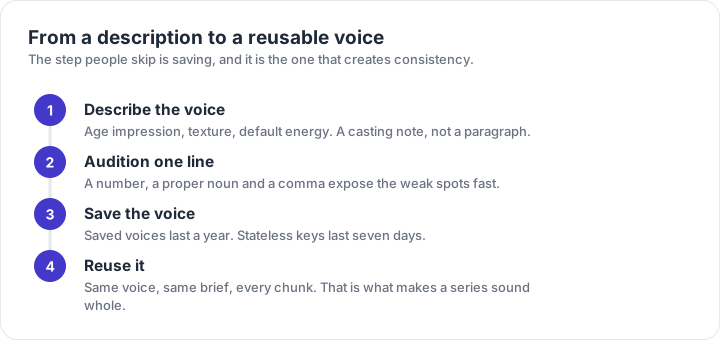
A voice description reads like a casting note, not like a paragraph of prose. Name the age impression, the texture of the voice and the energy it defaults to. Then audition one sentence that contains a number, a proper noun and a comma, because those three are where a designed voice usually falls apart.
A woman in her late thirties with a warm, slightly husky voice. Measured pace, conversational register, small smile audible on friendly lines. Neutral North American accent.
Notice what the description does not contain: no mention of the audience, the product or the mood of the whole video. Those belong in the style brief at generation time, because they change per script. A voice description should describe a person, and a brief should describe a performance.
Saving, reusing and the clock
A designed voice is only useful if you can get it back. Saved voices are the durable route: 200 per project, one year of life. Stateless voice keys are the convenient route and they expire after seven days, which is fine for a single session and a trap for a campaign that runs for a quarter.
- Save the voice as soon as an audition passes. A good take you cannot reproduce is a coincidence, not an asset.
- Record the voice name and the date it was saved in the project notes, next to the model identifier.
- Re-audition a saved voice at the start of a new season of content; a year is shorter than most publishing schedules.
- Never build a client deliverable on a stateless key, however convenient it was during the session.
Where the same voice shows up
| Surface | What it gives you | Typical job |
|---|---|---|
| Google AI Studio | Browser playground: paste a script, pick a voice, download the WAV | Auditioning and one-off renders |
| Gemini API | Programmatic access for apps, batch dubbing and pipelines | Batch dubbing and app features |
| Gemini Notebook | Long documents turned into narrated audio inside the notebook workspace | Turning long documents into audio |
| Google Vids | Narration inside a video project, no separate audio file to manage | Narration inside a video project |
Availability of the voice design workspace is not identical across accounts and regions. If the entry is missing, the presets and the saved voices you already own still work; the designer is the part that depends on your access. That is a reason to keep a preset fallback in any production plan, not a reason to abandon a custom voice.
Availability of the voice design workspace is not identical across accounts and regions. If the entry is missing, the presets and the saved voices you already own still work; the designer is the part that depends on your access. That is a reason to keep a preset fallback in any production plan, not a reason to abandon a custom voice.
Frequently asked questions
What is a voice generator in AI Studio?
It is the part of the speech tooling that lets you go beyond the 30 presets: describe a voice, audition the result, and save it so the same character can be reused across requests instead of recast every time.
Can I create a voice from my own recording?
Voice replication is a separate capability from voice design and is not available to every account. Check what your workspace exposes before planning a project around a cloned voice, and get consent from any speaker you record.
How many custom voices can I keep?
The documented ceiling for saved voices is 200 per project, with a one-year lifetime. Stateless voice keys are shorter-lived at seven days, so anything you intend to reuse next quarter should be saved rather than passed around as a key.
Do custom voices work with two speakers?
Two speakers per request is the ceiling regardless of whether the voices are presets or saved custom voices. A scene with three characters is three requests plus an edit.
Why does a saved voice sound different a month later?
Saved voices have a lifetime, and a voice referenced by a stateless key expires after seven days. If a voice has aged out, the request falls back to something else or fails, which is why a series should keep its own voice identifier in the project notes.