Models
Gemini text to speech: four models, one decision
Two general-availability models and two previews share a script format and a voice list. The differences show up in acting, latency and status — and status is the one that decides whether you can build a product on it.
Four models, one script format
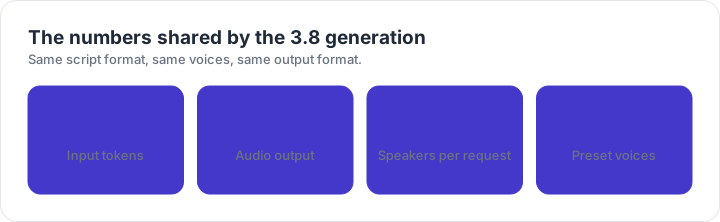
The current TTS line-up is two general-availability models and two previews. They accept the same kind of transcript, they draw from the same 30 preset voices, and they all stop at two speakers per request. If you learn one, you have learned the interface for all four. The differences show up in the audio, in the latency, and in which optional voice features you can reach.
The line-up at a glance
| Model | Model identifier | Best for |
|---|---|---|
| Gemini 3.8 Flash TTS | gemini-3.8-flash-tts | Highest acoustic fidelity: acting, dialect work, heavy vocal tags, two-speaker scenes |
| Gemini 3.8 Flash-Lite TTS | gemini-3.8-flash-lite-tts | Fast, cost-efficient workhorse: bulk dubbing, read-aloud features, everyday single speaker |
| Gemini 3.1 Flash TTS Preview | gemini-3.1-flash-tts-preview | Previous preview generation: single and multi-speaker, no voice design or replication |
| Gemini 2.5 Pro Preview TTS | gemini-2.5-pro-preview-tts | Legacy preview kept for existing pipelines; move new work to the 3.8 generation |
Status matters more than the version number. A general-availability model is the one to build a product on: behaviour is stable, quota is documented, and support exists when something breaks. A preview model is a moving target, and building a client deliverable on one is a scheduling risk rather than a technical one.
Which model for which job
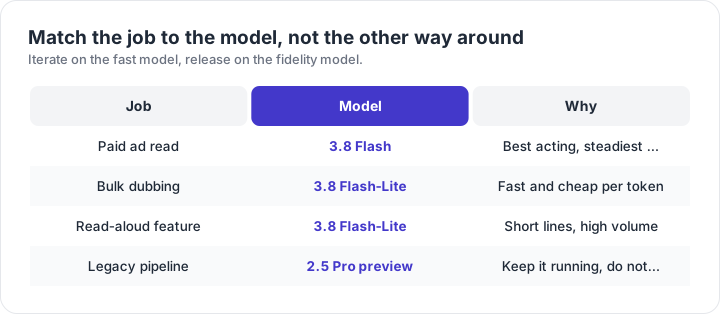
The pattern that works for most teams is a two-stage loop. Iterate on Flash-Lite while the script is still moving: it returns fast enough that you can fix a sentence and hear the result in the same sitting. Once the script is frozen, render the final take on Flash. The audio is better, and because the script is stable you only pay for one pass.
What actually changes between generations
Three things, and they are worth understanding because they change how you write. First, the newer generation treats the transcript as a verbatim script: it says what is written, including stage directions, which is why acting notes moved into the style field. Second, delivery control is expressed as metadata rather than as prose in the text, so a single script can produce a calm narrator and an excited host without a rewrite. Third, vocal tags inside the line are handled more literally, which is a gain when you want a laugh in the right place and a liability when you leave angle brackets in by accident.
The older previews behave differently enough that a prompt written for the 3.8 generation can sound wrong on them. If you must keep a preview model in production, freeze its prompts alongside the model identifier and do not copy briefs across generations without an audition.
Latency, cost and the honest trade-off
Faster models are cheaper per token and return sooner, which matters when you are generating hundreds of clips for a catalogue, a course library or a localisation pass. Slower models are worth their cost in exactly one place: the take that ships. A useful habit is to budget two renders per finished minute — one on the fast model to lock the script, one on the fidelity model for the release.
Do not choose a model by its name. Generate the same eight-second line on each candidate and listen on the playback path your audience actually uses. Model preference arguments are almost always arguments about a specific sentence, and one sentence is not a benchmark.
Moving a project between models
- Re-audition the voice: the same preset name does not guarantee the same timbre across generations.
- Re-check the brief: style metadata is interpreted more literally by the newer models.
- Regenerate the tail of any long script and cross-fade it, rather than assuming the join still matches.
- Keep the model identifier in your project notes next to the voice name and the brief.
Frequently asked questions
What is the difference between Gemini 3.8 Flash TTS and Flash-Lite TTS?
Both speak the same script format and use the same 30 preset voices. Flash gives you the higher fidelity model: better acting, steadier accents, more convincing handling of vocal tags. Flash-Lite trades some of that for speed and a lower per-token cost, which is why bulk dubbing and read-aloud features usually start there.
Are the preview models still usable?
Yes. The 3.1 Flash TTS preview and the 2.5 Pro preview still work, which matters if you have a pipeline built around them. They are not where new work should start: they predate the style field behaviour of the 3.8 generation and they do not offer the same voice features.
How much audio can one request return?
The 3.8 generation accepts up to 8K input tokens and returns up to 64K output tokens of audio. In practice that is a long chapter rather than a whole audiobook, and long work still goes better in chunks so a single bad paragraph does not force a full re-render.
Which model should I use for a paid ad read?
Start with 3.8 Flash. Ads live or die on the last five percent of delivery, and that is exactly where the fidelity model earns its cost. Generate two takes with different style briefs and pick in the edit rather than regenerating until something feels right.
Do all four models sound the same with the same voice?
No. A preset voice name is shared, but the acoustic result differs by generation: the 3.8 models are noticeably better at breath, consonant detail and emotional range. If you move a project between models, audition the same line in both before you commit.